6 reasons your development team should be using instant messaging

The ElectricAccelerator development team sits at desks less than 30 feet apart, but despite our close proximity, we don’t often speak to one another. To an outside observer this may seem to be a sign of disfunction in the team — after all, developers have to communicate to work effectively. Some people think we’re obviously not communicating, but the truth is that we’re not obviously communicating! That’s because we use instant messaging for most of our communications, including status updates, technical collaboration and even code reviews, rather than face-to-face conversations. I believe this has made my team more connected and more productive. Here are six reasons why instant messaging trumps face-to-face conversations for software teams.

1. Logging

The key advantage of instant messaging is that all conversations are logged automatically. As a result I’ve got records of every conversation with every member of my team for the past two years. That’s proven invaluable on a few occasions, to provide additional context for decisions made weeks or months earlier. Obviously this is not a replacement for other types of project documentation, but it is a fantastic supplement.

2. Non-intrusive

The second most important advantage of instant messaging is that it’s relatively non-intrusive, at least compared to a face-to-face conversation. We all know how important it is to get into and preserve a state of flow when programming. Spoken conversations, by social convention, command your immediate attention — effectively an interrupt of the highest order. When somebody comes to my desk to ask me something in person, they are implicitly saying, “What I have to say to you is more important than anything else you might be doing right now.” Sometimes that’s true, but many times it’s not. And yet every time somebody initiates a face-to-face conversation with me, it destroys whatever flow I might have developed.

In contrast, instant messaging allows me to defer a response until I reach a good breaking point, so people can ask questions without interrupting me.

3. Non-disruptive

Our office has an open floor plan, which means that instead of individual offices or cubicles, we have a single big room. This layout worked very well when the company had only 6 people, who were all working on the same project. Now the company employs over 100 people, with two separate development teams working on completely different products, so the open layout doesn’t work quite so well. Conversations between other people can be very distracting when you’re heads down on a tricky technical problem. By using instant messaging instead of face-to-face conversations, we significantly reduce the distraction for our collegues.

4. Simultaneous conversations

Carrying on multiple face-to-face conversations on disparate topics is practically impossible, but doing the same via instant messenger is simple. Every IM client I’ve seen displays the last several messages of each active conversation, so you have context when a new message arrives. That signficiantly reduces the mental burden associated with each conversation, so it becomes possible to sustain several simultaneously. I often have five conversations “active” during the work day, and sometimes even more.

5. Consistency

Unlike face-to-face conversations, IM works well regardless of the relative locations of the conversants. That means that it doesn’t matter if my colleague is in the office with me, or working from home, or working from a customer site, or halfway around the world. I can use the same tool to communicate with them, which in turn means I don’t have to change the way I work to accomodate changes in the way they are working.

6. Versatility

One final advantage of instant messaging compared to face-to-face conversation is the versatility of the medium. I can trivially share a code fragment with somebody via IM, or a link to an online resource. Try doing that in a face-to-face conversation: “Yeah, you should check out the STL reference docs, at aich tee tee pee colon slash slash double you double you double you dot …”.

Instant messaging: give it a try

If you’re not already using instant messaging in your development team, give it a try. There are multiple free IM services out there, and there are good free IM clients on every platform, including smart phones, so you’ve really got nothing to lose — but you might gain a more efficient, productive team. It worked for us.

LEGO “Ship It!” Awards

Scriptics Connect 1.1 "Ship It!" Award

What am I supposed to do with this?


When we wrapped up the ElectricAccelerator 6.0 release recently, I wanted to give my teammates something to commemorate the release. Traditionally these are called “Ship It!” awards, and they often take the form of a Lucite plaque or trophy, or even a physical copy of the product (on DVD or CD, for example) locked inside an acrylic block. I’ve gotten a couple of those over the years, and honestly I think they’re kind of a waste. The last one I got went on a shelf to collect dust for a few years before being relocated to the trash heap, which is a shame because those things are expensive. Really expensive. I can’t even imagine the cost of the monster awards that Microsoft gives out.

So I don’t really like the usual embodiment of the “Ship It” award, but I do really like the underlying idea. After all, shipping a software release is a significant accomplishment, the culmination of months or even years of effort by a team of smart individuals. And unlike many other human endeavors, there’s nothing tangible when you’re finished — no bridge spanning the bay nor tower reaching to the heavens. Having something to commemorate the accomplishment seems fitting, and it’s another small way that I can show my appreciation for everybody’s contributions.

The Ideal “Ship It!” Award

To me, the ideal “Ship It!” award has the following attributes:

  • Themeable: I wanted something I could customize for each release, while maintaining consistency across releases. I plan to make this a tradition.
  • Inexpensive: I wanted something I could bankroll myself, so I could retain complete creative control.
  • Compact: I wanted something that wouldn’t take up much space, so it would be portable and easy to display.
  • Geek appeal: I wanted something that my teammates would think is cool. Chunks of Lucite just don’t cut it.

LEGO “Ship It!” Awards

LEGO race car driver minifig

The winner!


After a few days of idle brainstorming and bouncing ideas off my manager and co-conspirator, I had what seemed like a great idea: LEGO minifigs. I could get a bunch of a specific LEGO minifig and give one to each person on the team. It fit all my criteria. There have been over 4,000 different minifigs released since 1978, according to The Cult of LEGO. In the last two years alone LEGO has release five minifig packs, each with 16 completely new figures, so I can count on having a unique character for every feature release for the next several years. Minifigs are cheap, too — the majority can be bought for as little as a couple dollars each on Amazon or ebay. They’re obviously small. And of course, minifigs are dripping with geek appeal. What techie doesn’t like LEGO?

There was just one small problem. Minifigs are a little bit too small. There’s nowhere to put the information that would identify what it represented — the product name, release version and date, and so on. A couple more days of brainstorming gave me the solution: custom baseball cards. There are several companies that will print custom baseball cards. These outfits are obviously intended for children’s sports teams, but they will happily print cards with whatever graphic you want. You just have to create images of the front and back of your card and upload to their website. And like the minifigs themselves, the cards are inexpensive, at about $1 per card.

The ElectricAccelerator 6.0 “Ship It!” Award

For the ElectricAccelerator 6.0 “Ship It!” Award, I chose the race car driver shown above (because Accelerator is all about performance, of course!). I bought the minifigs on ebay. I spent a couple hours designing the card, then ordered them from CustomSportsProducts.com. The front shows the minifig, the product name, version, and release date, and the major new features; the back lists the names of everybody on the team. Total cost for awards for the entire team was about $40 for materials — about the cost of just one traditional Lucite-based “Ship It” award.

I was a little nervous when I presented the awards to my team a couple weeks ago, but as it turns out I needn’t have been! The reception was overwhelmingly positive. Although I hadn’t explicitly planned it this way, the minifigs actually arrived unassembled, in individual pouches. Immediately upon getting theirs, each person dumped out the pieces and started assembly — it was practically instinctive! Several people commented out loud that the award was “Awesome!” or “Really cool,” and, of course, “Kinda nerdy, but cool!” With that kind of reaction, you can bet that I’m already planning for the next release.

And finally, here’s a picture of the ElectricAccelerator 6.0 “Ship It!” Award, as it is proudly displayed on my desk:

ElectricAccelerator 6.0 "Ship It!" Award

Who doesn't love LEGO?

Best of blog.melski.net — October 2011

Here are the posts that got the most views in October 2011:

  1. Halloween 2010 Haunted Graveyard: 28% of views
  2. What’s new in ElectricAccelerator 6.0: 17% of views
  3. Electric Cloud Customer Summit 2011 by the Numbers: 15% of views
  4. Shell commands in GNU make: 7% of views
  5. Exceptions to conflict detection in ElectricMake: 6% of views

The article about last year’s Halloween graveyard generated a lot of traffic, all thanks to search results — lots of people looking for ideas for their own Halloween decorations. I hope they found some inspiration from my meager attempt! If you liked that post, you’ll probably enjoy the post-mortem for this year’s graveyard!

Halloween 2011 Haunted Graveyard Post Mortem

Another year, another Halloween party. And another Halloween party means another Haunted Graveyard in the backyard! This year is my fourth attempt. You can see pictures of last year’s graveyard here. I got lots of compliments from the party guests for that effort, probably because it was a huge improvement over 2009 — of course, that just set the bar that much higher for this year!

The first step in setting up the graveyard was actually taken last year — the day after Halloween I hit the 50% off sale at the Spirit Halloween Superstore, so I picked up a few more characters and decorations at a huge discount. You’ll see pictures of the new guys below. One thing I was not able to find at the sale was a fog machine. In previous years I borrowed one from my sister-in-law, but I really wanted to have my own. So this year, a couple weeks before Halloween, I sucked it up and bought a few at regular price — expensive, but absolutely worth it!

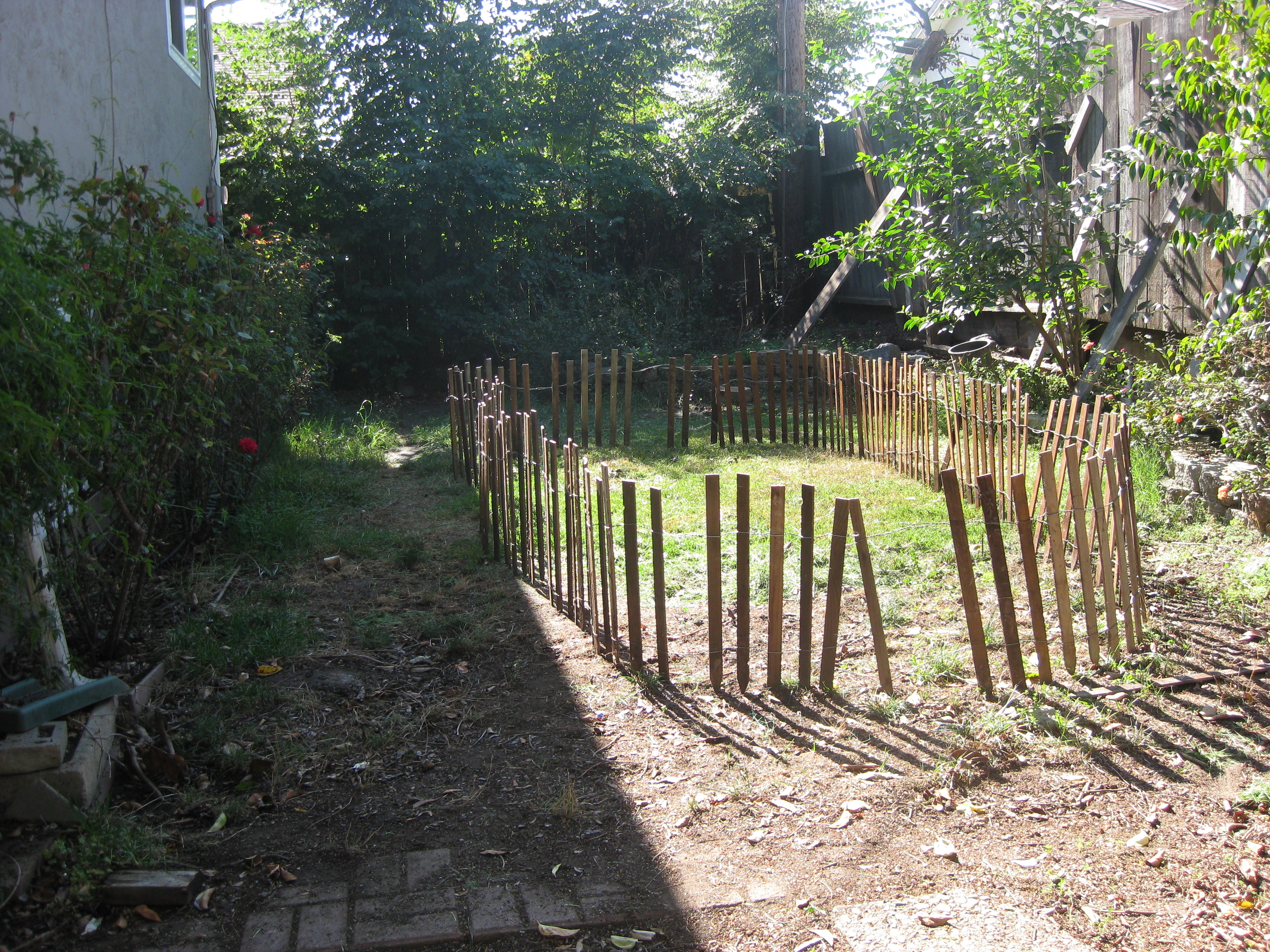
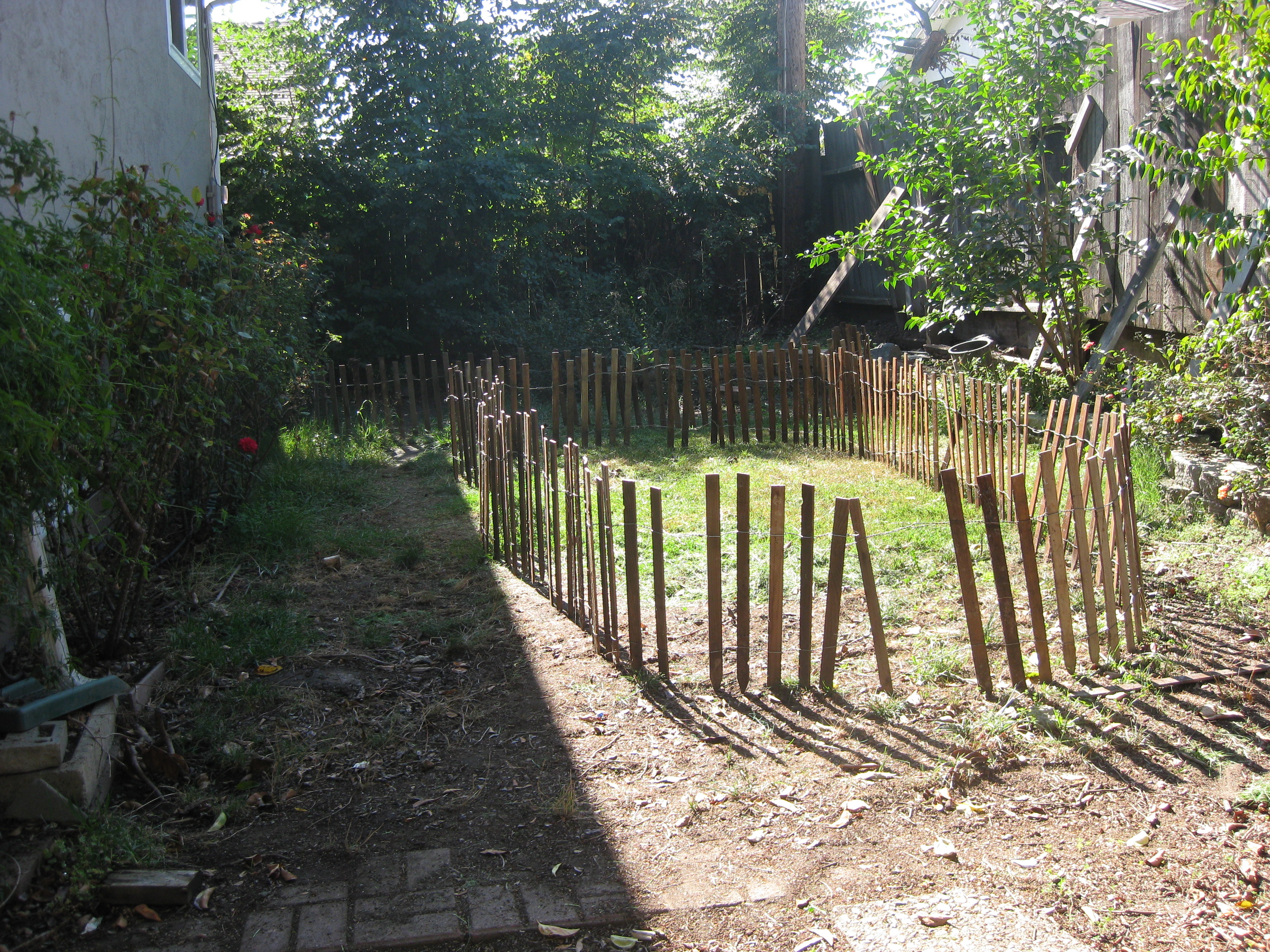
So, once I had all my inventory assembled, the next step was to setup the perimeter. I used the same 2 foot fencing this year, as that seemed to work really well last year to direct traffic and avoid people tripping over cords. I think I ended up with a little bit more area inside the fence than I did last year (you can click on any of these pictures to see a larger version):

Next I started to populate the graveyard — these guys are just dying to get in there. First in was this great zombie. He lays flat on the ground, then pops up and makes creepy noises when people walk by. One thing I learned with this guy is that you have to put a heavy block on the front of the stand — otherwise he’ll catapult forward when the latch releases, because the spring is really powerful:

Next I added the mummy and the animated ghost guy, you probably recognize them from last year:

And of course my favorite space-filling decoration: Styrofoam tombstones:

OK, now things get interesting. Like I said, we had some trees trimmed back over the summer, so I didn’t have as many places to hang decorations. So this year I strung a rope from a hook screwed into the eaves of the house down to the fence on the other side of the yard. Then I positioned some of my characters on the rope. I tied knots in the rope to keep the characters from slipping down the line. The guy in the middle is the same ghost I used last year, but the guys on the the ends of the line are both new this year:

I brought back the plain white masks too, I really liked the look of those last year. I moved them to the other side of the yard though, so they had a more prominent display:

No graveyard is complete without cobwebs of course:

Here’s a close-up shot of one of the new characters. He’s some kind of scary-looking ghost thing. He’s actually really tall, six feet at least. He doesn’t do any but look spooky, though, which is a little disappointing. I set up a purple flood light to shine on him:

Here’s a close-up shot of the giant light-up, inflatable spider that I borrow from my sister-in-law every year. He sits in the back of the yard, so he’s hard to see in most of the pictures here:

And here’s the second new character this year. This guy is awesome! He’s labeled the “flying animated reaper” or something like that, and his eyes light up, his wings flap (!!), in a really creepy, unnatural way, and he makes spooky noises. I got him for only about $30 on sale, and everybody loved him — definitely my favorite character this year:

And of course I had to bring back the Zombie Barbies from last year. This time I made tiny nooses for them and hung them from the fence, instead of leaving them on the ground, so they’d be easier to see. I put a small red strobe on them too:

Finally, of course, here’s the obligatory “action shot”. I love how the colored lights make the bushes look like they’re on fire! I assure you that’s just an artifact of the color management in my camera — nothing was actually burning!

All in all, I think this year’s graveyard was a great success. There’s still a lot of room for improvement though, and the pressure is really on now — I think the kids that come to the party are getting braver faster than I am making the graveyard spookier at this point, so if I don’t step it up next year, they’re all just going to laugh at me!

A couple final thoughts and suggestions for those who might stumble across this page while planning their own Halloween decorations:

  • If you’re thinking about buying a fog machine, go big. The small machines are a waste of money. They just don’t generate much fog.
  • On the other hand, I highly recommend the Low Lying Fog Machine. This is a regular fog machine with an extra compartment for ice, which cools the fog as it comes out, so the fog stays low to the ground. It works like a champ! The only problem is the cycle time is pretty long — between 2 and 3 minutes — so you might want to get more than one machine and set them to fire at staggered intervals.
  • Make sure you take advantage of the “day after” sales! I picked up a huge new “zombie barrel” character for $75, and a second low fogger for just $35 this year.

I can’t wait for next year! I need to figure out a way to rig a zipline, so I can make that tall ghost guy come flying at my victims guests, and some kind of curtain to separate the graveyard, so you can’t see the whole thing at once. Hope to see you there!

Electric Cloud Customer Summit 2011 by the Numbers

Earlier this month, Electric Cloud hosted the fourth annual Electric Cloud Customer Summit. By any measure it was a fantastic success, with more people, more content, and lots of enthusiastic and intelligent customers. I thought it would be fun to look at some statistics from this year’s event.

How many people showed up?

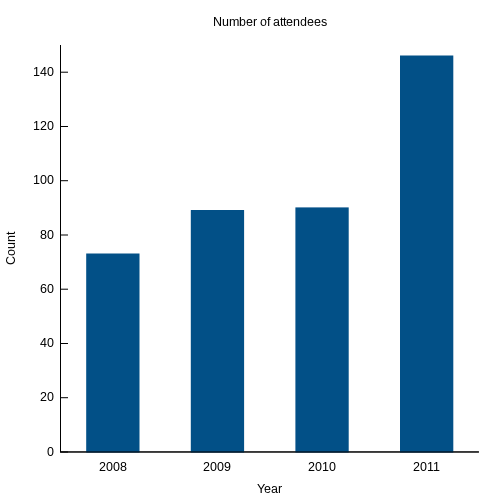
The most obvious metric is simply the count of attendees. In 2011, there were 146 attendees (excluding Electric Cloud employees). That’s literally double the number that showed up for the first summit in 2008:

This was the first summit for the majority of those present, but a significant minorty — nearly 25% — had been to at least one previous summit. Several are “Summit All-Stars”, having attended all four!


Who presented?

Another way to measure the growth of the summit is to look at the number of presentations each year, and the proportion of those that were given by customers or partners, rather than by Electric Cloud employees. In 2011, a healthy 40% of the presentations were given by customers and partners, including two panel sessions, and a keynote from GE about how Electric Cloud enabled the transition to agile development:


Where did they come from?

The vast majority of participants were from the United States, but several braved international travel to attend. Here are the countries represented:

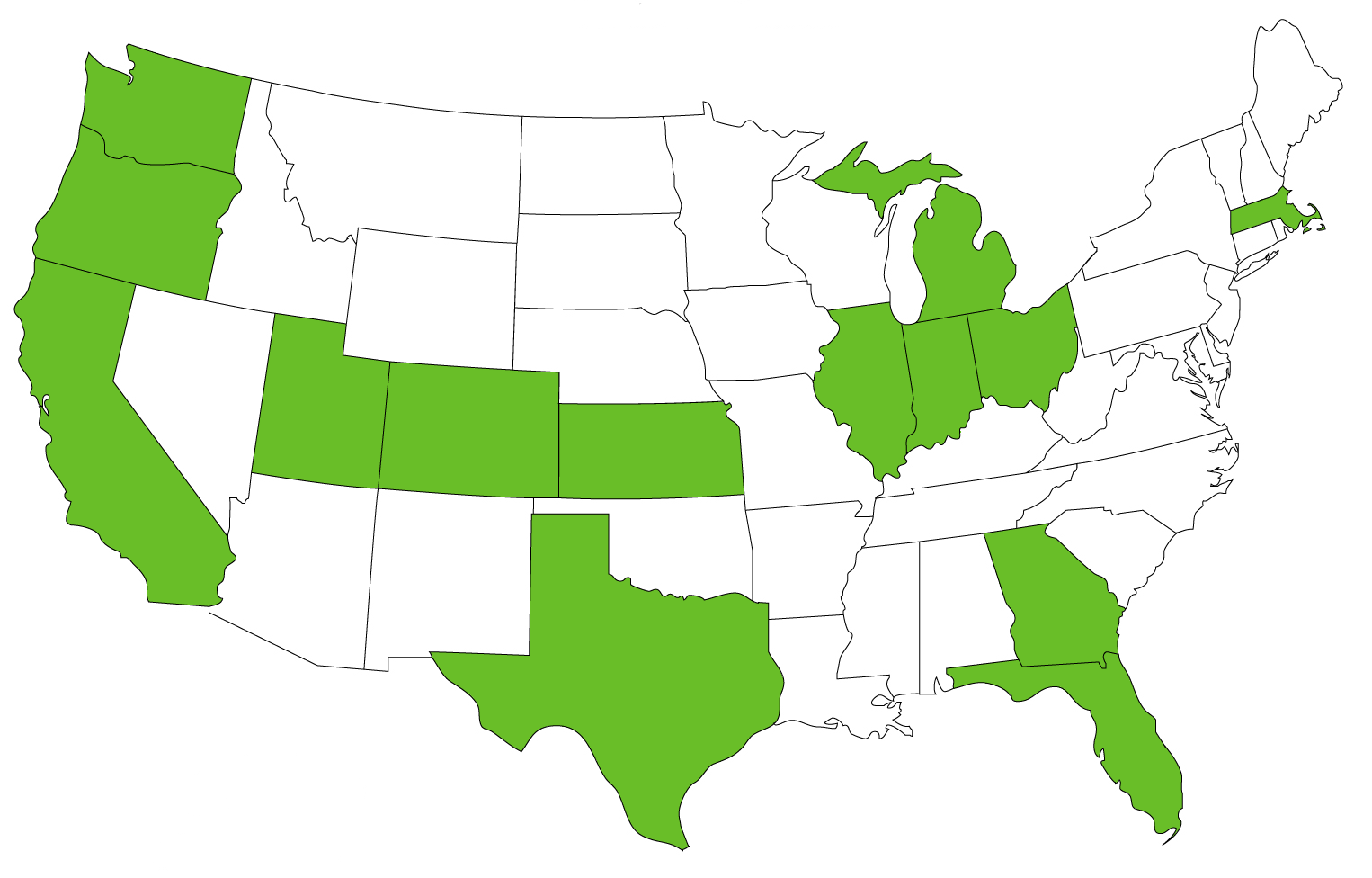
Within the United States, 14 states were represented:


How many companies were represented?

This year’s summit was a fantastic place to network, with nearly 60 companies represented, across a wide range of industries. This tag cloud shows the industries, scaled by the number of people from each:

One thing that surprised me is the number of people sent by each company. I expected that most companies would send only one person, but in fact most companies sent at least two. Three companies sent ten or more!


When did attendees register?

I thought it might be interesting to see how far in advance people registered for the summit. It’s not surprising that there’s a spike the week before, although the magnitude of the jump is less than I expected. In fact, less than 25% of the registrations occurred the week before and the week of the summit:


Looking forward to 2012

I had a lot of fun at the 2011 Customer Summit. It was great to finally put faces to the names of people I’ve collaborated with, sometimes for years before meeting face-to-face. And it was a pleasure to see so many familiar faces as well. Here’s hoping the 2012 summit is just as fruitful.

One final thought: if you have any suggestions for additional statistics that might be interesting here, let me know in the comments.

What’s new in ElectricAccelerator 6.0

Last week Electric Cloud announced the release of ElectricAccelerator 6.0. The most exciting development in this version is the addition of ElectricAccelerator Developer Edition, which enables users to leverage the rapidly increasing horsepower on their multicore workstations to accelerate their builds, as well as the cluster agents we’ve always supported. Even better, Developer Edition allows you to use emake to accelerate builds even when disconnected from the network, with all of the benefits you’ve come to depend on: reliable parallel builds, accurate incrementals — all that good stuff.

But there’s much more to Accelerator 6.0 than just Developer Edition. Several improvements make this the most robust, secure and easy-to-use release ever. Here are the major new features:

Electrify command-line interface overhaul

electrify is the alternate front-end to the Accelerator cluster that enables users to accelerate non-make-based builds (like SCons and JAM) as well as general purpose cluster parallel computing tasks. Accelerator 5.0 was the first release to include electrify, but that version was relatively unpolished — a minimal viable product strategy that we hoped would allow us to prove the technology in the field and provide feedback to guide the technical direction of electrify over subsequent releases. As a result of that feedback we made significant improvements to both the functionality and performance of electrify in the 5.2 and 5.4 releases, but electrify still retained the “charm” of its original clumsy user interface. At long last, we’ve taken the first big step towards addressing that in 6.0, which incorporates a significantly streamlined electrify interface. I won’t bother showing the “old clunky way” here — if you’ve been using electrify you already know, and if you haven’t, I’d rather you never see it. But I’m very pleased to show you how easy it is to accelerate a SCons build with electrify in Accelerator 6.0:

electrify --emake-cm=eacm --electrify-remote=gcc:ld scons -j 8

There are still a few warts, but then, if we fixed everything what would people complain about?

Kerberos authentication

For environments with heightened security requirements, Accelerator 6.0 supports Kerberos authentication. This improvement ensures the identity of the individual running emake and the agents that participate in the build. That means that emake can be certain that any agents it connects to are legimiate agents, rather than trojans set up to capture potentially sensitive information from emake. At the same time, it means that the agents can be certain of the authenticity of the connection from emake, so malicious users cannot spoof the connection to the agent.

Note that at this time Accelerator only provides authentication of the connction between emake and an agent. It does not encrypt traffic once the connection is established.

Submake usage reporting

One thing that occassionally causes trouble for people switching to emake is the so-called submake stub problem. The issue arises when a build uses constructs like this:

foo.a:
	$(MAKE) -C sub foo.a && cp sub/foo.a ./foo.a

With emake, the recursive make invocation is not processed inline, as you might normally expect. Instead, to maximize parallel performance across all the recursive makes in the build, a make stub captures the invocation context, relays it to the top-level emake for incorporation into the overall build graph, and exits immediately. Because the cp call is part of the same command, it runs immediately after the stub, but since none of the work of the submake has actully executed yet, the cp will fail.

Correcting this requires a trivial makefile change. Instead of chaining the recursive make and the cp together in a single command, this rule can be rewritten to explicitly use two distinct commands. With this minor adjustment, emake is able to treat the cp as a separate job that logically occurs after the work in the recursive make:

foo.a:
	$(MAKE) -C sub foo.a
	cp sub/foo.a ./foo.a

Although it’s generally straightforward to remedy the problem, it’s not always easy to determine that a build has run into a submake stub problem. Thus in Accelerator 6.0 we added a feature that will make it easier to identify these situations: if you enable file- or lookup-level annotation detail, emake will record an explicit submake usage operation in the job that invoked the recursive make, so you can tell exactly when the submake occurs relative to other file usage in the job. In the example above, the usage log for the job will contain something like this:

<op type="submake" file="/home/ericm/build/sub"/>
<op type="lookup" file="/home/ericm/build/sub/foo.a" found="0"/>

The presence of file usage after the submake operation is a warning flag that the job may have a submake stub vulnerability.

Optionally enable directory read conflicts

Another long-standing thorn-in-the-side for users switching to emake is builds that depend on strict accuracy of directory listing operations. Briefly, although emake can ensure that directory listings are 100% correct throughout the build, for performance reasons emake deliberately ignores the directory read conflicts that would provide that assurance. For a thorough explanation of the problem and the rational for that design decision, see my previous post on Exceptions to conflict detection in ElectricMake. For now, suffice to say that Accelerator 6.0 includes a new command-line option that forces emake to honor directory read conflicts: –emake-readdir-conflicts=1.

Agent log rotation

Last, but certainly not least, after only 10 years Accelerator finally incorporates a feature that’s been standard on Unix operating systems probably since the dawn of the epoch: the Accelerator agent now monitors the size of its debug log, and automatically rolls over to a new logfile when the log gets too big. That’s sure to be welcome news to anybody that’s had to enable agent debug logging while working with our support team.

Looking forward

As you can see, there’s a lot of great improvements in Accelerator 6.0. As always, I’m tremendously proud of the effort my engineering team has put into the product. Of course, a product like Accelerator is never really done. We’re already working on the next release. Stay tuned for updates on what we’re doing next.

Accelerator 6.0 is available immediately for current customers — contact support@electric-cloud.com for details. New users contact sales@electric-cloud.com.

2011 Customer Summit “Conflicts” Handout

As promised, here’s the corrected handout to accompany the presentation I gave at the 2011 Electric Cloud Customer Summit, “Conflict Detection in ElectricMake”. This content is also available as a pair of blog articles:

  1. How ElectricMake guarantees reliable parallel builds
  2. Exceptions to conflict detection in ElectricMake

Thanks to everybody who came to the talk! I really enjoyed giving it and answering your questions. Looking forward to seeing you next year!

Exceptions to conflict detection in ElectricMake

In a previous article I covered the basic conflict detection algorithm in ElectricMake. It’s surprisingly simple, which is one of its strengths. But if ElectricMake strictly adhered to the simple definition of a conflict, many builds would be needlessly serialized, sapping performance. Over the years we’ve made a variety of tweaks to the core algorithm, adding support for special cases to improve performance. Here are some of those special cases.

Non-existence conflicts

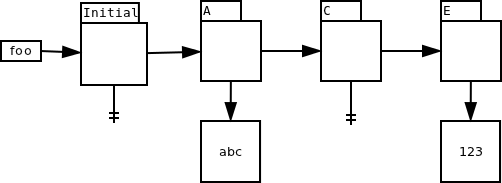
One obvious enhancement is to ignore conflicts when the two versions are technically different, but effectively the same. The simplest example is when there are two versions of a file which both indicate non-existence, such as the initial version and the version created by job C in this chain for file foo:

Suppose that job D, which falls between C and E in serial order, runs before any other jobs finish. At runtime, D sees the initial version, but strictly speaking, if it had run in serial order it would have seen the version created by job C. But the two versions are functionally identical — both indicate that the file does not exist. From the perspective of the commands run in job D, there is no detectable difference in behavior regardless of which of these two versions was used. Therefore emake can safely ignore this conflict.

Directory creation conflicts

A common make idiom is mkdir -p $(dir $@) — that is, create the directory that will contain the output file, if it doesn’t already exist. This idiom is often used like so:

$(OUTDIR)/foo.o: foo.cpp
	@mkdir -p $(dir $@)
	@g++ -o $@ $^

Suppose that the directory does not exist when the build starts, and several jobs that employ this idiom start at the same time. At runtime they will each see the same filesystem state — namely, that the output directory does not exist. Each job will therefore create the directory. But in reality, had these jobs run serially, only the first job would have created the directory; the others would have seen the version created by the first job, and done nothing with the directory themselves. According to the simple definition of a conflict, all but the first (serial order) job would be considered in conflict. For builds without a history file expressing the dependency between the later jobs and the first, the performance impact would be disastrous.

Prior to Accelerator 5.4, there were two options for avoiding this performance hit: use a good history file, or arrange for the directories to be created before the build runs. Accelerator 5.4 introduced a refinement to the conflict detection algorithm which enables emake to suppress the conflict between jobs that both attempt to create the same directory, so even builds with no history file will not get conflicts in this scenario, without sacrificing correctness. (NB: you need not take special action to enjoy the benefits of this improvement).

Appending to files

Another surprisingly common idiom is to append error messages to a log file as the build proceeds:

$(OUTDIR)/foo.o: foo.cpp
	@g++ -o $@ $^ 2>> err.log

Implicitly, each append operation is dependent on the previous appends to the file — after all, how will you know which offset the new content should be written to if you don’t know how big the file was to begin with? In terms of file versions, you can imagine a naive implementation treating each append to the file as creating a complete new version of the file:

The problem of course is that you’ll get conflicts if you try to run all of these jobs in parallel. Suppose all three jobs, A, B and C start at the same time. They will each see the initial version, an empty file, but if run serially, only A would have seen that version. B would have seen the version created by A; C would have seen the version created by B.

This example is particularly interesting because emake cannot sort this out on its own: as long as the usage reported for err.log is the very generic “this file was modified, here’s the new content” message normally used for changes to the content of an existing file, emake has no choice but to declare conflicts and serialize these jobs. Fortunately, emake is not limited to that simple usage record. The EFS can detect that each modification is strictly appending to the file, with no regard to the prior contents, and include that detail in the usage report. Thus informed, emake can record fragments of the file, rather than the entire file content:

Since emake now knows that the jobs are not dependent on the prior content of the file, it need not declare conflicts between the jobs, even if they run in parallel. As emake commits the modifications from each job, it stitches the fragments together into a single file, with each fragment in the correct order relative to the other pieces.

Directory read conflicts

Directory read operations are interesting from the perspective of conflict detection. Consider: what does it mean to read a directory? The directory has no content of its own, not in the way that a file does. Instead, the “content” of a directory is the list of files in that directory. To check for conflicts on a directory read, emake must check whether the list of files that the reader job actually saw matches the list that it would have seen had it run in serial order — in essence, doing a simple conflict check on each of the files in the directory.

That’s conceptually easy to do, but the implications of doing so are significant: it means that emake will declare a conflict on the directory read anytime any other job creates or deletes any file in that directory. Compare that to reads on ordinary files: you only get a conflict if the read happens before a write operation on the same file. With directories, you can get a conflict for modifications to other files entirely.

This is particularly dangerous because many tools actually perform directory reads under-the-covers, and often those tools are not actually concerned with the complete directory contents. For example, a job that enumerates files matching *.obj in a directory is only interested in files ending with .obj. The creation of a file named foo.a in that directory should not affect the job at all.

Another nasty example comes from utilities that implement their own version of the getcwd() system call. If you’re going to roll your own version, the algorithm looks something like this:

  1. Let cwd = “”
  2. Let current = “.”
  3. Let parent = “./..”
  4. stat current to get its inode number.
  5. read parent until an entry matching that inode number is found.
  6. add the name from that entry to cwd
  7. Set current = parent.
  8. Set parent = parent + “/..”
  9. Repeat starting with step 4.

By following this algorithm the program can construct an absolute path for the current working directory. The problem is that the program has a read operation on every directory between the current directory and the root of the filesystem. If emake strictly adhered to conflict checking on directory reads, a job that used such a tool would be serialized against every job that created or deleted any file in any of those directories.

For this reason, emake deliberately ignores conflicts on directory read operations by default. Most of the time this is safe to do, surprisingly — often tools do not need a completely accurate list of the files in the directory. And in every case I’ve seen, even if the tool does require a perfectly correct list, the tool follows the directory read with reads of the files it finds. That means that you can ensure correct behavior by running the build one time with a single agent, to ensure the directory contents are correct when the job runs. That run will produce history based on the file reads, so subsequent builds can run with many agents and still produce correct results.

Starting with Accelerator 6.0, you can also use –emake-readdir-conflicts=1 to force emake to honor directory read conflicts.

Conclusion

Getting parallel builds that are fast is easy: just add -j to your make invocation. Getting parallel builds that are both fast and reliable is another story altogether. As you’ve seen, the core conflict detection algorithm in ElectricMake is simple, but after many years and hundreds of thousands of builds, we’ve enhanced that simple algorithm in a variety of special cases to provide even better performance. Future releases of ElectricAccelerator will include even more refinements to the algorithm.

HOWTO: diagnose build failures with ElectricMake and ElectricInsight

The other day a colleague asked for my help determining the cause of a broken build. When run with ElectricMake, the build consistently failed with this error:

Error: Could not open include file "api.h".
make: *** [js/src/jsreflect.o] Error 1

Diagnosing problems like this is similar to investigation in any scientific field: form a hypothesis, devise an experiment to test it, and use the results of the experiment to refine the hypothesis; then repeat until you can explain the observed behavior. In this case I didn’t have access to the build environment so I couldn’t run builds myself, which limited my ability to experiment somewhat. Instead, I had to rely on the data my colleague provided: an emake annofile from the build, with lookup-level logging. If you can only get one build artifact for debugging, that’s a pretty good choice.

Hypothesis: api.h does not exist

The first thing to check is whether the file api.h exists at all. If it doesn’t, that would explain the failure. Of course, I had been told that this build works with gmake, so this is a pretty flimsy hypothesis — but it pays to be thorough.

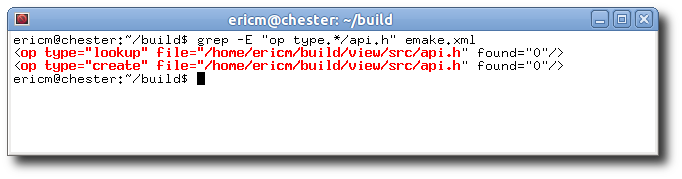
One way to test this theory is to check the usage reported on the file. If the only usage is failed lookups, then the file never existed. If you see other usage, like reads or modifications to the file, that invalidates this hypothesis. We can use grep to search the annotation for usage on the file:
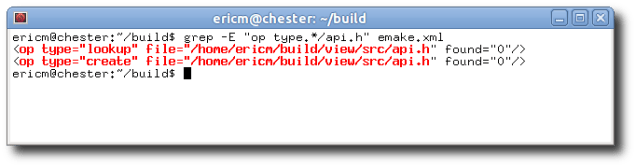
The file is clearly created during the build, so this theory is BUSTED.

Hypothesis: the writer job comes after the reader job

Since the file is created during the build, perhaps the problem is that the job that created it occurs later in the build than the job that needs it. That could happen if the makefile was set up incorrectly, for example. Like the previous theory, this one is on shaky ground because the build allegedly works with gmake. It’s easy to test though: find the job that created the file, and the job that reported the error, then compare their serial order — the order in which they would have run if the build were executed serially. If the writer has a later serial order, then the hypothesis is confirmed. Otherwise, the hypothesis is invalidated.

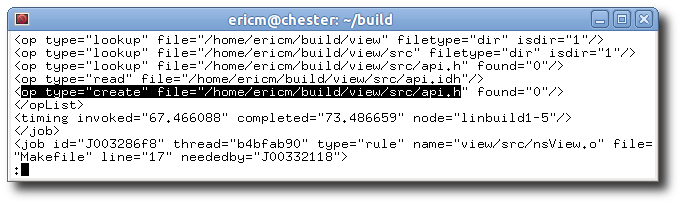
To find the writer job, I use less to search for the create operation referencing that file:

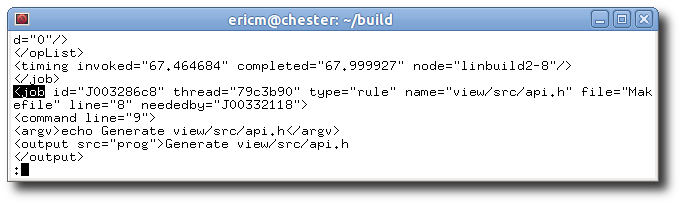
Then I search backwards for the containing <job> tag to determine which job created the file:

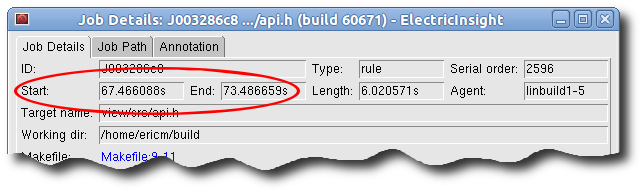
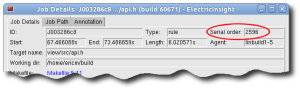
Now we know the file was created by job J003286c8. The easiest way to find the job’s serial order is to load the annotation in ElectricInsight, then bring up the Job Details window for the job (use Tools -> Find job by ID and enter the job to go directly to the Job Details):
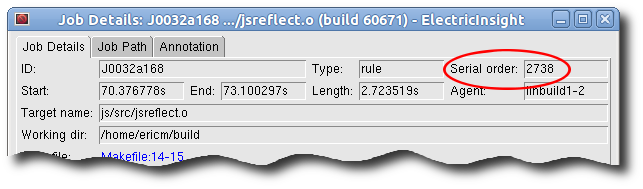
To find the job that reported the error, search for failed jobs in ElectricInsight. That leads us to job J0032a168:
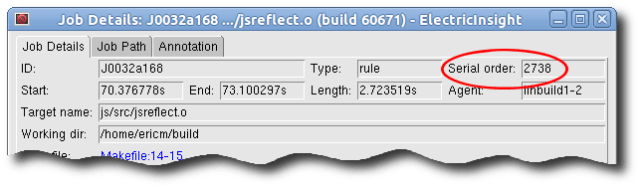
The writer has an lower serial order than the reader, meaning the writer comes first. Therefore this theory is also BUSTED.

Hypothesis: the reader job ran before the writer job finished

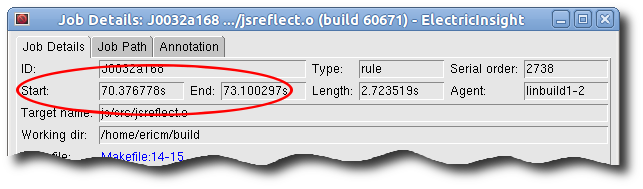
Since the writer precedes the reader in serial order, perhaps the problem is that the jobs were executed in the wrong order. We can test this hypothesis by checking the start and end time of each job, again by looking at the Job Details in ElectricInsight. Here’s the writer:

And the reader:

The jobs were actually running at the same time so this hypothesis is CONFIRMED.

Now we know why the reader failed to find the file: it ran before the writer finished, so naturally the file was not available. But this raises an entirely new and more perplexing question: this is precisely the type of dependency problem that ElectricMake is supposed to prevent, so why didn’t it work this time?

Hypothesis: conflict detection is completely broken

If everything is working correctly, emake ought to have detected a conflict in the reader job, discarded the bogus result, and rerun the job after the writer finished. A bug in emake’s conflict detection system could explain why emake failed to detect the dependency between the jobs and rerun the reader. We could construct any number of elaborate tests to try to prove that conflict detection is broken, but before we disappear down that rabbit hole, we should check the file usage recorded in the reader job. If we find usage that should have caused a conflict with the writer job, then we can continue with this line of investigation. But if there is no such usage, then we can reject this theory.

For an overview of conflict detection, read “How ElectricMake guarantees reliable parallel builds”. Briefly, in order for conflict detection to work there must be usage in the reader that references api.h. That’s how emake knows that the reader tried to use the file. When emake checks for conflicts, it will see that usage, and realize that the job accessed the wrong version of the file based on the serial order of the job. At minimum we should see a lookup operation recorded on the file.

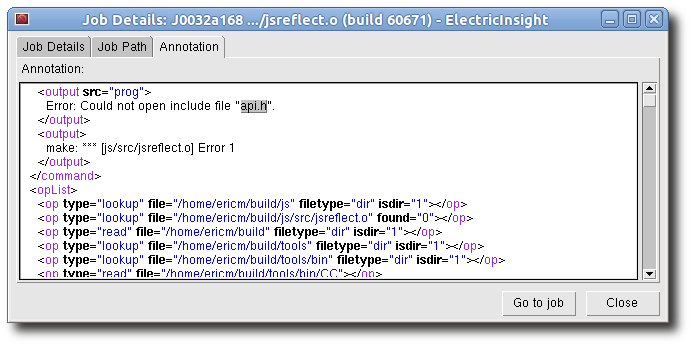
We can find the file usage for the reader on the Annotation tab of the Job Details for the job in ElectricInsight. You can use CTRL-F to search for occurances of the string api.h in the job annotation. But in this case, there’s only one, in the error message text. There’s no usage recorded for the file, lookup or otherwise:

So this theory is clearly BUSTED. There was no conflict because there was no usage on the file in the reader job. But again, this result raises a new question: why is there no usage referencing api.h?

Hypothesis: there was a problem accessing the parent directory

A problem accessing the parent directory would explain why there is no usage for api.h. After all, you can’t lookup a file in a directory if you can’t access the directory itself. To verify this theory we have to check for usage on the parent directory, of course. If there is none, then we can consider the theory confirmed, and we will have to come up with an explanation for that failure. But if there is usage on the parent directory, we can reject this theory. Specifically, we ought to see a lookup recorded for the parent directory, captured as a side effect of the compiler accessing files in the directory.

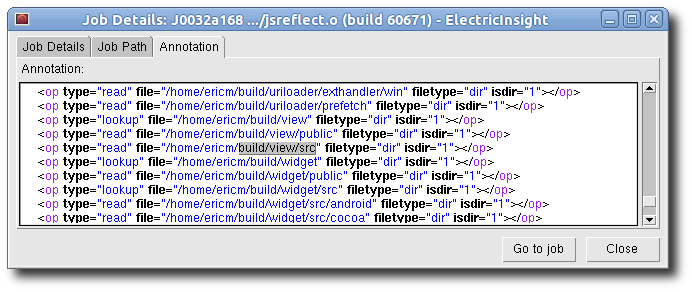
So we turn again to the Annotation tab of the Job Details for the reader job in ElectricInsight. This time we’ll search for the string build/view/src, which turns up just one match:

There is usage recorded for the parent directory, so this theory is BUSTED.

But there’s a surprise lurking in the result: instead of a lookup, we see a read recorded on the directory. Why is that surprising? Consider what a compiler does: read the source file, locate and read include files, and write the output file. Nothing in that description requires reading directories. This leads us to a new hypothesis, which explains both the peculiar usage and the build failure.

Hypothesis: the compiler caches directory listings to avoid system calls

The simplest way to search for include files is to stat() the file in each directory given in the include path. If the stat() succeeds, you’ve found the file; if not, try the next directory.

This is simple, but inefficient if you have many directories in your include path. Suppose you have 300 directories, and 10 include files. On average you’ll check half of the directories before finding each file, for a total of 1,500 stat() calls! As everybody “knows”, system calls are slow, so some clever compilers use a different strategy: cache the listing of each directory in a hash table, then consult this cache, rather than using stat(). With 300 directories, you can do a few hundred getdents() system calls, instead of thousands of stat() calls. Brilliant!

There’s just one problem: this trick conceals from emake the fact that the job tried to find api.h. Since the lookup never hit the filesystem, emake has no record of it, and therefore cannot detect the conflict.

Sidebar: directory read conflicts

Of course, emake can still detect the conflict — by comparing the contents of the directory as they were with the contents as they should have been. That is, emake can tell that the reader job got a particular set of filenames for the directory listing, and that the set would have been different if the reader had run at the correct time — it would have included api.h.

This is an example of a directory read conflict. The important thing to know is that emake deliberately ignores these conflicts. If it didn’t, many builds would be horribly over-serialized — usually when programs read directories during a build, they don’t actually care about the entire directory listing. If emake strictly honored directory read conflicts, a job that read a directory would be serialized against every job that created or deleted any file in that directory. Nobody wants that.

Fortunately, there’s a solution: once the compiler has found the include file, it goes on to read it, of course. The read gets recorded in the job’s file usage, and that gives emake enough information to properly serialize the reader and the writer. So we need only to ensure that the filesystem state is correct when the reader runs, for a single run of the build. After that, emake will record the dependency in its history file, which will ensure correct behavior in subsequent builds. One easy way to do this is to run a single-agent build, using –emake-maxagents=1. That forces each job to run serially. This mode is how we will test our final hypothesis. If we’re correct, then the build will succeed; if not, the build will still fail.

Epilogue

As I stated, I didn’t have access to this build myself, so I had to wait for the user to test this hypothesis. When they did, they found that the single-agent build succeeded, and by checking the file usage for the reader job in the new build, we can see a read of api.h, as expected. Our final theory is CONFIRMED: the build failed because the compiler caches directory listings instead of doing direct filesystem lookups for include files, and emake intentionally ignores directory read conflicts.

The simplest solution to the problem is to generate a good history file by running emake with –emake-maxagents=1, but you could also add an explicit dependency between the jobs in the makefile; or you could wait for ElectricAccelerator 6.0, which will include a feature that allows you to explicitly enable directory read conflicts with a command-line option.