Top posts for December 2010

The following articles generated the most traffic in November. Unfortunately I don’t have stats for my articles on the Electric Cloud Blog this month, but here’s the data for the top five posts on blog.melski.net:

  1. Makefile hacks: print the value of any variable: 89% of page views
  2. Shell commands in GNU make: 4% of page views
  3. HOWTO: install kernel debuginfo packages on SUSE Linux Enterprise Server 11: 2% of page views
  4. Cloud computing for traditional dev/test: 1% of page views
  5. Public versus private clouds for dev/test: 1% of page views

The top article, Makefile hacks: print the value of any variable was wildly popular, which is great, but also skewed the numbers pretty heavily. The price of (small) success, I suppose.

Bash completion for ElectricAccelerator

Maybe you haven’t noticed, but Electric Make (emake) has a lot of command-line options. Besides the options it inherits from emulating GNU make (or NMAKE), it has about fifty of its own options, from –emake-annodetail to –emake-tmpdir. Remembering them all, and their exact spelling, and their allowed values is a nuisance, even for me — and I created half of those options myself. So, I spent the last few evenings hacking together Bash TAB completion support for emake (download from github here), with pretty good results:

$ emake --emake-h<TAB><TAB>
--emake-history=        --emake-historyfile=  
--emake-history-force=

In addition to helping with emake options, it can help me remember the valid values for those options:

$ emake --emake-history=<TAB><TAB>
create  merge  read

It handles options with compounds values too, like –emake-annodetail:

$ emake --emake-annodetail=<TAB><TAB>
basic  env  file  history  lookup  registry  waiting
$ emake --emake-annodetail=file,<TAB><TAB>
file,basic     file,history   file,registry  
file,env       file,lookup    file,waiting   
$ emake --emake-annodetail=file,history,<TAB><TAB>
file,history,basic     file,history,registry
file,history,env       file,history,waiting
file,history,lookup    

It can even do TAB completion on targets in makefiles, thanks to some clever code inherited from the gmake completion module that I used as the basis for my emake completion module:

$ emake <TAB><TAB>
all        check      distclean  Makefile   
buildtest  clean      install    

And since I was already tinkering with TAB completion for emake, it wasn’t much work to do TAB completion for ElectricInsight (einsight) as well. In that case, TAB completion doesn’t really do a whole lot — einsight doesn’t have many command-line options. But intelligent TAB completion is still pretty handy for one specific reason: I can make it only match files with the correct extension — .xml and .anno:

$ ls
build-272.dlog  build-272.xml
build-273.dlog  build-273.xml
$ einsight <TAB>
$ einsight build-27<TAB><TAB>
build-272.xml  build-273.xml  

Rather than suggesting all of the files in the directory, Bash now knows to suggest only the .xml files when I invoke einsight.

I was surprised to find that setting up custom TAB completion for my applications is pretty easy: just create a shell function that generates a list of possible completions based on a partial command-line, then instruct the shell to use that function to handle completions for whatever command you like. As far as I can tell, the mechanism is pretty flexible — you’re limited only by your own Bash scripting skill. If you’re interested in doing something like this yourself, I suggest you check out these online tutorials, as well as the Bash Completion project, which includes completion modules for nearly 200 commands.

Availability and installation

You can download the TAB completion module for emake and einsight from my github repository. As far as installation goes, you have a few options:

  1. Hook into the bash-completion package. Many modern Linux distributions, including Ubuntu 9.x/10.x and SUSE 11 install the bash-completion package and set up the default bashrc file to use it. On those systems, you can just copy accelerator.sh to /etc/bash_completion.d.
  2. Modify your personal .bashrc. If your system doesn’t have the bash-completion package, or if you can’t add files to etc, you can modify your own .bashrc to source accelerator.sh on startup. In that case I would rename it to $(HOME)/.accelerator.sh, so that it is normally hidden from directory listings, and add source $(HOME)/.accelerator.sh to your .bashrc file.

The image at the top of this post is free; you can redestribute it and/or modify it according to the terms of the Free Art License; it is based on this image by Aurelio Heckert.

Eternal vigilance and multithreaded programming

Given the following:

  • A multithreaded application written in C++, using the STL.
  • A class Mutex, which is a thin wrapper around a pthread_mutex_t.
  • A class Lock, which implements the RAII pattern for acquiring and releasing a Mutex.
  • A class FileInfo, which stores information about a file. The getSize() method retrieves the current size of the file. Because another thread may be changing the size of the file, getSize() is internally locked.
  • A class Cache, which manages a map of filenames to FileInfo objects.

Can you spot the bug in this bit of code?

class Cache {
protected:
    typedef std::map<string, FileInfo *> map_type;

    Mutex mLock;
    map_type mMap;

public:
    void insert(const string& filename, FileInfo *info)
    {
        // Add a new file to the cache.

        Lock lock(mLock);
        mMap.insert(make_pair(filename, info));
    }

    void invalidate(const string& filename)
    {
        // Eject a file from the cache; this only
        // invalidates the cache entry, it does not
        // delete the associated FileInfo.

        Lock lock(mLock);
        map_type::iterator i = mMap.find(filename);
        if (i != mMap.end()) {
            mMap.erase(i);
        }
    }

    int64_t getSize(const string& filename)
    {
        // Get the current size of a file in the cache.

        map_type::iterator i;

        {
            // Grab the cache lock for the lookup.

            Lock lock(mLock);
            i = mMap.find(filename);
            if (i == mMap.end()) {
                return 0;
            }
        } // release cache lock

        // Relay the getSize() request to the FileInfo
        // object; this must happen <i>after</i> releasing
        // the cache lock, because FileInfo::getSize() 
        // can block.

        return i->second->getSize();
    }
};

Even if you’re familiar with the STL and multithreaded programming, the defect can be hard to spot. In fact, this one escaped my notice until a recent mysterious core dump alerted me to its presence, despite having read this code several times for other reasons.

Here’s the bug: in Cache::getSize(), the iterator i is accessed outside the protection of the Cache lock. You may think that this is safe, since the lookup occurs inside the lock. But suppose we have two threads running simultaneously, one calling getSize(“foo”), and the other calling invalidate(“foo”):

Thread A: getSize(“foo”) Thread B: invalidate(“foo”)
{
    Lock lock(mLock);
    i = mMap.find(filename);
    if (i == mMap.end()) {
       return 0;
    }
} // release cache lock
Lock lock(mLock);
i = mMap.find(filename);
if (i != mMap.end()) {
    mMap.erase(i);
}
return i->second->getSize();

By the time Thread A uses the iterator returned by map::find(), the call to invalidate() has, well, invalidated it. I suspect that the author of this code remembered that map::erase() invalidates the iterator used in the erase() itself, but not the corollary that map::erase() also invalidates any other iterator that references the same element.

If you think about how std::map is implemented, it’s obvious that erase() should have this property. Internally, std::map usually uses some type of balanced tree. With that foundation, the simplest implementation of std::map::iterator is just a thin wrapper around a pointer to a node in the tree. map::erase() must delete that node (otherwise, when would it be deleted?), so accessing an iterator after it has been erase‘d is literally a free memory read, an obvious memory management error.

In this case, the solution is simple: just extract the FileInfo pointer from the iterator before releasing the Cache lock, as follows:

    int64_t getSize(const string& filename)
    {
        // Get the current size of a file in the cache.

        FileInfo *info;

        {
            // Grab the cache lock for the lookup.

            Lock lock(mLock);
            map_type::iterator i = mMap.find(filename);
            if (i == mMap.end()) {
                return 0;
            }
            info = i->second;
        } // release cache lock

        // Relay the getSize() request to the FileInfo
        // object; this must happen <i>after</i> releasing
        // the cache lock, because FileInfo::getSize() 
        // can block.

        return info->getSize();
    }

Eternal vigilance

The interesting thing about this bug is that it would have been nearly impossible to detect with testing alone. This is why code reviews are so important in our profession, and why projects that really demand bug-free code rely so heavily on them. As they say, “Eternal vigilance is the price of multithreaded programming.” With that, I’m off to review some more code. Shouldn’t you?

Top posts for November 2010

The following articles generated the most traffic in November. Still mostly articles that I wrote for the Electric Cloud Blog, but the number one entry is actually from blog.melski.net, and I think there would have been another, except that I only published the article on November 30:

  1. Shell commands in GNU make: 38% of page views
  2. Makefile performance: $(shell): 19% of page views
  3. A second look at SCons performance: 6% of page views
  4. What’s new in GNU make 3.82: 6% of page views
  5. The last word on SCons performance: 4% of page views

What’s most interesting to me this month is the search performance of Shell commands in GNU make. I wrote that article specifically because I see a lot of search traffic from queries like “makefile shell”, “shell command in makefile” and other variants of that theme. To my disappointment, all of those searches still bring people to Makefile performance: $(shell), rather than to the new article. Not sure what I did wrong there. Perhaps it was the inclusion of the word “GNU” in my new article? Anybody with more SEO experience care to comment?

HOWTO: install kernel debuginfo packages on SUSE Linux Enterprise Server 11

I needed to debug a kernel crash on SUSE Linux Enterprise Server 11 today. If you’re not familiar with debugging Linux kernel crashes, you need the kernel debug symbols in order to analyze the crash dump. These are typically not part of the kernel image itself, but instead are bundled into a kernel debuginfo package corresponding to the kernel that produced the crash dump.

Although I’ve done this on RedHat Enterprise Linux many times, I had never debugged a kernel crash on SUSE before, so I was not familiar with the process for acquiring the debuginfo packages with that distro. I couldn’t find any single set of instructions explaining how to get the packages, and although it wasn’t hard, I figured I’d try to save somebody else a little time by writing down the steps I followed.

SUSE uses a package manager called ZYpp. I used zypper, the command-line interface to ZYpp, to install the packages.

Step 1: enable the debuginfo repositories

Before zypper can install the debuginfo packages, it must be able to find them. The packages reside in specialized debuginfo repositories, which are normally not enabled, although the system is aware of them. Use zypper repos to get a list of the repositories:

lin4-ea6:~ # zypper repos
# | Alias                                                    | Name                                                   | Enabled | Refresh
--+----------------------------------------------------------+--------------------------------------------------------+---------+--------
1 | SUSE-Linux-Enterprise-Server-11 11-0                     | SUSE-Linux-Enterprise-Server-11 11-0                   | Yes     | No     
2 | SUSE-Linux-Enterprise-Software-Development-Kit-11_11-0   | SUSE-Linux-Enterprise-Software-Development-Kit-11 11-0 | Yes     | No     
3 | SUSE-Linux-Enterprise-Software-Development-Kit-11_11-0_1 | SUSE-Linux-Enterprise-Software-Development-Kit-11 11-0 | Yes     | No     
4 | nu_novell_com:SLE11-Debuginfo-Pool                       | SLE11-Debuginfo-Pool                                   | No      | Yes    
5 | nu_novell_com:SLE11-Debuginfo-Updates                    | SLE11-Debuginfo-Updates                                | No      | Yes    
6 | nu_novell_com:SLES11-Extras                              | SLES11-Extras                                          | No      | Yes    
7 | nu_novell_com:SLES11-Pool                                | SLES11-Pool                                            | No      | Yes    
8 | nu_novell_com:SLES11-Updates                             | SLES11-Updates                                         | Yes     | Yes    

You want the two Debuginfo repos. To enable them, use zypper modifyrepo with the alias of the repo:

lin4-ea6:~ # zypper modifyrepo --enable nu_novell_com:SLE11-Debuginfo-Pool
Repository 'nu_novell_com:SLE11-Debuginfo-Pool' has been sucessfully enabled.
lin4-ea6:~ # zypper modifyrepo --enable nu_novell_com:SLE11-Debuginfo-Updates
Repository 'nu_novell_com:SLE11-Debuginfo-Updates' has been sucessfully enabled.

Step 2: find the debuginfo package for your crash

It’s critical to get the debuginfo package that matches the kernel that created your crash dump. It’s easy to determine the version you need: check the README.txt alongside the vmcore in the crash directory:

lin4-ea6:~ # cat /var/crash/2010-11-30-00:43/README.txt
Kernel crashdump
----------------

Crash time     : 2010-11-30 00:43 (+0000)
Kernel version : 2.6.27.45-0.1-pae
Host           : SLES-11-32
Dump level     : 0
Dump format    : compressed

In this case, I need the debuginfo for the pae variant of kernel version 2.6.27.45-0.1. Now, search the package repository for kernel debuginfo packages with zypper search:

lin4-ea6:~ # zypper search -s kernel-*-debuginfo*

Loading repository data...
Reading installed packages...

S | Name                     | Type    | Version          | Arch | Repository             
--+--------------------------+---------+------------------+------+------------------------
  | kernel-default-debuginfo | package | 2.6.27.54-0.2.1  | i586 | SLE11-Debuginfo-Updates
  | kernel-default-debuginfo | package | 2.6.27.48-0.12.1 | i586 | SLE11-Debuginfo-Updates
  | kernel-default-debuginfo | package | 2.6.27.48-0.6.1  | i586 | SLE11-Debuginfo-Updates
  | kernel-default-debuginfo | package | 2.6.27.48-0.1.1  | i586 | SLE11-Debuginfo-Updates
  | kernel-default-debuginfo | package | 2.6.27.45-0.1.1  | i586 | SLE11-Debuginfo-Updates
  | kernel-default-debuginfo | package | 2.6.27.42-0.1.1  | i586 | SLE11-Debuginfo-Updates
  | kernel-default-debuginfo | package | 2.6.27.39-0.3.1  | i586 | SLE11-Debuginfo-Updates
  | kernel-default-debuginfo | package | 2.6.27.37-0.1.1  | i586 | SLE11-Debuginfo-Updates
  | kernel-default-debuginfo | package | 2.6.27.29-0.1.1  | i586 | SLE11-Debuginfo-Updates
  | kernel-default-debuginfo | package | 2.6.27.25-0.1.1  | i586 | SLE11-Debuginfo-Updates
  | kernel-default-debuginfo | package | 2.6.27.23-0.1.1  | i586 | SLE11-Debuginfo-Updates
  | kernel-default-debuginfo | package | 2.6.27.21-0.1.2  | i586 | SLE11-Debuginfo-Updates
  | kernel-default-debuginfo | package | 2.6.27.19-5.1    | i586 | SLE11-Debuginfo-Pool   
  | kernel-pae-debuginfo     | package | 2.6.27.54-0.2.1  | i586 | SLE11-Debuginfo-Updates
  | kernel-pae-debuginfo     | package | 2.6.27.48-0.12.1 | i586 | SLE11-Debuginfo-Updates
  | kernel-pae-debuginfo     | package | 2.6.27.48-0.6.1  | i586 | SLE11-Debuginfo-Updates
  | kernel-pae-debuginfo     | package | 2.6.27.48-0.1.1  | i586 | SLE11-Debuginfo-Updates
  | kernel-pae-debuginfo     | package | 2.6.27.45-0.1.1  | i586 | SLE11-Debuginfo-Updates
  | kernel-pae-debuginfo     | package | 2.6.27.42-0.1.1  | i586 | SLE11-Debuginfo-Updates
  | kernel-pae-debuginfo     | package | 2.6.27.39-0.3.1  | i586 | SLE11-Debuginfo-Updates
  | kernel-pae-debuginfo     | package | 2.6.27.37-0.1.1  | i586 | SLE11-Debuginfo-Updates
  | kernel-pae-debuginfo     | package | 2.6.27.29-0.1.1  | i586 | SLE11-Debuginfo-Updates
  | kernel-pae-debuginfo     | package | 2.6.27.25-0.1.1  | i586 | SLE11-Debuginfo-Updates
  | kernel-pae-debuginfo     | package | 2.6.27.23-0.1.1  | i586 | SLE11-Debuginfo-Updates
  | kernel-pae-debuginfo     | package | 2.6.27.21-0.1.2  | i586 | SLE11-Debuginfo-Updates
  | kernel-pae-debuginfo     | package | 2.6.27.19-5.1    | i586 | SLE11-Debuginfo-Pool   
  | kernel-source-debuginfo  | package | 2.6.27.54-0.2.1  | i586 | SLE11-Debuginfo-Updates
  | kernel-source-debuginfo  | package | 2.6.27.48-0.12.1 | i586 | SLE11-Debuginfo-Updates
  | kernel-source-debuginfo  | package | 2.6.27.48-0.6.1  | i586 | SLE11-Debuginfo-Updates
  | kernel-source-debuginfo  | package | 2.6.27.48-0.1.1  | i586 | SLE11-Debuginfo-Updates
  | kernel-source-debuginfo  | package | 2.6.27.45-0.1.1  | i586 | SLE11-Debuginfo-Updates
  | kernel-source-debuginfo  | package | 2.6.27.42-0.1.1  | i586 | SLE11-Debuginfo-Updates
  | kernel-source-debuginfo  | package | 2.6.27.39-0.3.1  | i586 | SLE11-Debuginfo-Updates
  | kernel-source-debuginfo  | package | 2.6.27.37-0.1.1  | i586 | SLE11-Debuginfo-Updates
  | kernel-source-debuginfo  | package | 2.6.27.29-0.1.1  | i586 | SLE11-Debuginfo-Updates
  | kernel-source-debuginfo  | package | 2.6.27.25-0.1.1  | i586 | SLE11-Debuginfo-Updates
  | kernel-source-debuginfo  | package | 2.6.27.23-0.1.1  | i586 | SLE11-Debuginfo-Updates
  | kernel-source-debuginfo  | package | 2.6.27.21-0.1.1  | i586 | SLE11-Debuginfo-Updates
  | kernel-source-debuginfo  | package | 2.6.27.19-5.1    | i586 | SLE11-Debuginfo-Pool   
  | kernel-vmi-debuginfo     | package | 2.6.27.54-0.2.1  | i586 | SLE11-Debuginfo-Updates
  | kernel-vmi-debuginfo     | package | 2.6.27.48-0.12.1 | i586 | SLE11-Debuginfo-Updates
  | kernel-vmi-debuginfo     | package | 2.6.27.48-0.6.1  | i586 | SLE11-Debuginfo-Updates
  | kernel-vmi-debuginfo     | package | 2.6.27.48-0.1.1  | i586 | SLE11-Debuginfo-Updates
  | kernel-vmi-debuginfo     | package | 2.6.27.45-0.1.1  | i586 | SLE11-Debuginfo-Updates
  | kernel-vmi-debuginfo     | package | 2.6.27.42-0.1.1  | i586 | SLE11-Debuginfo-Updates
  | kernel-vmi-debuginfo     | package | 2.6.27.39-0.3.1  | i586 | SLE11-Debuginfo-Updates
  | kernel-vmi-debuginfo     | package | 2.6.27.37-0.1.1  | i586 | SLE11-Debuginfo-Updates
  | kernel-vmi-debuginfo     | package | 2.6.27.29-0.1.1  | i586 | SLE11-Debuginfo-Updates
  | kernel-vmi-debuginfo     | package | 2.6.27.25-0.1.1  | i586 | SLE11-Debuginfo-Updates
  | kernel-vmi-debuginfo     | package | 2.6.27.23-0.1.1  | i586 | SLE11-Debuginfo-Updates
  | kernel-vmi-debuginfo     | package | 2.6.27.21-0.1.2  | i586 | SLE11-Debuginfo-Updates
  | kernel-vmi-debuginfo     | package | 2.6.27.19-5.1    | i586 | SLE11-Debuginfo-Pool   
  | kernel-xen-debuginfo     | package | 2.6.27.54-0.2.1  | i586 | SLE11-Debuginfo-Updates
  | kernel-xen-debuginfo     | package | 2.6.27.48-0.12.1 | i586 | SLE11-Debuginfo-Updates
  | kernel-xen-debuginfo     | package | 2.6.27.48-0.6.1  | i586 | SLE11-Debuginfo-Updates
  | kernel-xen-debuginfo     | package | 2.6.27.48-0.1.1  | i586 | SLE11-Debuginfo-Updates
  | kernel-xen-debuginfo     | package | 2.6.27.45-0.1.1  | i586 | SLE11-Debuginfo-Updates
  | kernel-xen-debuginfo     | package | 2.6.27.42-0.1.1  | i586 | SLE11-Debuginfo-Updates
  | kernel-xen-debuginfo     | package | 2.6.27.39-0.3.1  | i586 | SLE11-Debuginfo-Updates
  | kernel-xen-debuginfo     | package | 2.6.27.37-0.1.1  | i586 | SLE11-Debuginfo-Updates
  | kernel-xen-debuginfo     | package | 2.6.27.29-0.1.1  | i586 | SLE11-Debuginfo-Updates
  | kernel-xen-debuginfo     | package | 2.6.27.25-0.1.1  | i586 | SLE11-Debuginfo-Updates
  | kernel-xen-debuginfo     | package | 2.6.27.23-0.1.1  | i586 | SLE11-Debuginfo-Updates
  | kernel-xen-debuginfo     | package | 2.6.27.21-0.1.2  | i586 | SLE11-Debuginfo-Updates
  | kernel-xen-debuginfo     | package | 2.6.27.19-5.1    | i586 | SLE11-Debuginfo-Pool   

You can see there are several versions of each variant available. One tricky thing is that there isn’t an exact match for the kernel version I need. I’m looking for 2.6.27.45-0.1; the closest thing to it is 2.6.27.45-0.1.1. This seems to be nothing more than a minor inconsistency in labeling: the 2.6.27.45-0.1.1 is the correct package.

Step 3: install the kernel debuginfo package

Having identified the package, you are ready to install it with zypper install:

lin4-ea6:~ # zypper install kernel-pae-debuginfo=2.6.27.45-0.1.1
Loading repository data...
Reading installed packages...
Resolving package dependencies...

The following NEW package is going to be installed:
  kernel-pae-debuginfo 


The following package is not supported by its vendor:
  kernel-pae-debuginfo 


Overall download size: 153.1 M. After the operation, additional 673.8 M will be used.
Continue? [YES/no]: 

At this prompt, you should type YES and hit Enter. zypper will download the package (which may take a while depending on the speed of your internet connection), showing a progress bar as it does:

Retrieving package kernel-pae-debuginfo-2.6.27.45-0.1.1.i586 (1/1), 153.1 M (673.8 M unpacked)
Retrieving: kernel-pae-debuginfo-2.6.27.45-0.1.1.i586.rpm [90% (1.1 M/s)]

Then zypper will install the package, again with a progress bar:

Retrieving package kernel-pae-debuginfo-2.6.27.45-0.1.1.i586 (1/1), 153.1 M (673.8 M unpacked)
Retrieving: kernel-pae-debuginfo-2.6.27.45-0.1.1.i586.rpm [done (244.7 K/s)]
Installing: kernel-pae-debuginfo-2.6.27.45-0.1.1 [84%]

When installation is complete, there is no more notification than that the progress bar reads “done”:

Retrieving package kernel-pae-debuginfo-2.6.27.45-0.1.1.i586 (1/1), 153.1 M (673.8 M unpacked)
Retrieving: kernel-pae-debuginfo-2.6.27.45-0.1.1.i586.rpm [done (244.7 K/s)]
Installing: kernel-pae-debuginfo-2.6.27.45-0.1.1 [done]

Step 4: symlink the debuginfo into the crash directory

The debuginfo package, for some reason, does not install the debuginfo files to a location known to the crash utility, so the final step is to make the debuginfo file available to crash before we invoke it. We do so by creating a symlink to the debuginfo file alongside the kernel image in the crash directory:

lin4-ea6:~ # ln -s /usr/lib/debug/boot/vmlinux-2.6.27.45-0.1-pae.debug /var/crash/2010-11-30-00:43

Decompress the kernel image and you’re in business:

lin4-ea6:~ # gzip -d /var/crash/2010-11-30-00:43/vmlinux-2.6.27.45-0.1-pae.gz
lin4-ea6:~ # cd /var/crash/2010-11-30-00:43
lin4-ea6:/var/crash/2010-11-30-00:43 # crash vmlinux-2.6.27.45-0.1-pae vmcore

Makefile hacks: print the value of any variable

One of my favorite makefile debugging tricks is this rule for printing out the value of a variable:

print-%:
        @echo '$*=$($*)'

Throw this into a GNU make makefile and then print any make variable you like by invoking targets like print-MAKE_VERSION:

ericm@chester:/tmp$ gmake print-MAKE_VERSION
MAKE_VERSION=3.81

You can imagine how handy this is when diagnosing issues with your makefiles. Here’s how it works:

  1. print-% defines a pattern rule that matches any target that starts with the characters print-.
  2. In the context of a pattern rule, the $* variable expands to the stem of the target, that part which matched the % in the pattern. In my example above, that corresponds to MAKE_VERSION.
  3. GNU make variable expansion rules allow for variable references inside variable names, so $($*) expands first to $(MAKE_VERSION), and finally to the value of the MAKE_VERSION variable.

Makefile injection with -f

The print-% rule is a slick hack, but it’s a nuisance to have to modify a makefile just to use it. Worse, you might not even be able to modify the makefile. Fortunately, there’s a solution: the -f command-line option. You’re probably familiar with it — that’s how you tell gmake to use a different makefile than the default Makefile when it starts. For example, if you have a makefile named build.mak:

gmake -f build.mak

What you may not know is that you can use multiple -f options on the command line. GNU make will read each file in turn, incorporating the contents of each just as if they were included with the include directive. We can create a simple makefile called printvar.mak containing nothing but our print-% rule, then inject it into any makefile we want like this:

gmake -f printvar.mak -f Makefile print-MAKE_VERSION

A shell script to save typing

The combination of the print-% rule and the -f command-line option is powerful, but it’s unwieldy — too many characters to type. The solution is a shell script wrapper:

#!/bin/bash

filename=""
if [ -f GNUmakefile ] ; then
  filename="GNUmakefile"
elif [ -f makefile ] ; then
  filename="makefile"
elif [ -f Makefile ] ; then
  filename="Makefile"
fi
if [ -n "$filename" ] ; then
  vars=""
  for n in $@ ; do
    vars="$vars print-$n"
  done
  gmake -f $filename -f printvar.mak $vars
else
  echo "No makefile found" 1>&2
  exit 1
fi

Save that in a file called printvars somewhere on your PATH and you can do things like this:

ericm@chester:/tmp$ printvars MAKE_VERSION COMPILE.cc
MAKE_VERSION=3.81
COMPILE.cc=g++    -c

Advanced make variable diagnostics

Beyond simply printing the value of a variable, GNU make 3.81 has three built-in functions that allow introspection on variables, which you can add to the print-% rule for additional diagnostics.

First is the $(origin) function, which tells you how a variable was defined. For example, if a variable FOO was inherited from the environment, $(origin FOO) will give the result environment. Variables defined in a makefile will give the result file, and so forth.

Next is the $(flavor) function, which tells you the flavor of the variable, either simple or recursive.

Finally is the $(value) function, which gives you the unexpanded value of the variable. For example, if you have variables like this:

FOO=123
BAR=$(FOO)

$(value BAR) will give the result $(FOO), rather than the fully-expanded 123 that you might expect.

With these additions, the print-% rule now looks like this:

print-%:
	@echo '$*=$($*)'
	@echo '  origin = $(origin $*)'
	@echo '  flavor = $(flavor $*)'
	@echo '   value = $(value  $*)'

And here’s how it looks in action:

ericm@chester:/tmp$ printvars MAKE_VERSION COMPILE.cc
MAKE_VERSION=3.81
  origin = default
  flavor = simple
   value = 3.81
COMPILE.cc=g++    -c
  origin = default
  flavor = recursive
   value = $(CXX) $(CXXFLAGS) $(CPPFLAGS) $(TARGET_ARCH) -c

Make syntax is the worst… except for all the alternatives

My series of comparisons between SCons and GNU make sparked a lot of discussion, not just about SCons and gmake, but about many other build tools. That was to expected, but what surprised me was several comments specifically criticizing the syntax of make — the semicolons, colons, ats and dollars that we all know so well. One reader actually said that make syntax has a 1970’s feel, as if the age of the language is somehow an indicator of unsuitability for the task. Then my friend John Graham-Cumming posted an article in defense of make syntax, and I figured I would add my thoughts.

Make syntax is the worst… except for all the alternatives

Criticisms of make syntax strike me as a bit absurd. Take a look around the build tool space: you’ll see that many of these “improved” tools use syntax that ranges from “pretty much the same” to “ridiculously verbose”. Let’s look at the syntax used for the two core functions of a build system: specifying the graph of depdencies between files, and specifying the commands to generate a file from a set of inputs.

Dependency graph syntax

The syntax for describing the relationship between input and output files in make is concise, if oblique:

foo: foo.in

To me this is elegant in its simplicity. You may argue that the choice of a colon is arbitrary, and you’d be right — but then, what would be significantly better? I would say there is nothing that is better, but plenty of things worse. For comparison, look at the same relationship, expressed in the syntax of some other build tools:

CMake
add_custom_command(
    OUTPUT foo
    COMMAND update -o foo foo.in
    DEPENDS foo.in)
Cook
foo: foo.in ;
Jam
MyCompile foo : foo.in ;
Rake
file foo => [ 'foo.in' ]
SCons
env.MyCompile('foo', 'foo.in')
tup
foo.in |> update -o %o %f |> foo
Waf
bld(
    rule     = 'update -o ${TGT} ${SRC}
    source   = 'foo.in',
    target   = 'foo')

Some of these, like Cook and Jam, are nearly identical to make. Others, like Waf, are certainly more verbose, but not obviously better. That verbosity may seem great when there’s only a handful of targets, but with hundreds of targets, it will be an irritation.

The truth is that there just isn’t any particular syntax that naturally lends itself to expressing a dependency graph. The reason make syntax hasn’t changed in over 30 years is because target: prereq works, and it’s just as good as anything else you might choose.

Command syntax

True to form, the syntax for specifying the commands to run to generate a file in make is just as terse:

update -o $@ $^

This minimalist syntax naturally puts the emphasis on the important stuff: the command to run and its flags. Here’s the same command in some other build tools (nota bene: some of these are the same as what’s shown above; in those cases I could not easily determine a syntax for specifying dependencies separately from commands, or whether that is even possible with that tool):

CMake
add_custom_command (
  OUTPUT foo
  COMMAND update -o foo foo.in
  DEPENDS foo.in
)
Cook
{
     update -o [target] [need];
}
Jam
rule MyRule
{
    MyCompile $(1) $(2) ;
}
actions MyCompile
{
    update -o $(1) $(2)
}
Rake
sh "update -o #{t.name} #{t.prerequisites.join(' ')}"
SCons
env.Append(BUILDERS =
  {'MyCompile': Builder(action = 'update -o $TARGET $SOURCE', 
    src_suffix='.in')})
tup
foo.in |> update -o %o %f |> foo
Waf
bld(
    rule     = 'update -o ${TGT} ${SRC}
    source   = 'foo.in',
    target   = 'foo')

Most of these are more verbose than make, and for me the extra text just makes it harder to see what’s really going on. The SCons example is particularly ugly: 6 times the characters to express the same simple command!

Did you mean TAB instead of 8 spaces?

I suspect that at the heart of complaints about make syntax is a single unfortunate confluence of facts. First, make uses a literal TAB character to mark the beginning of a command in a recipe. Second, most code editors automatically replace TAB with spaces. Together these facts conspire to confound even the most experienced makefile writer, resulting in this slightly condescending, always irritating error message:

*** missing separator (did you mean TAB instead of 8 spaces?)

.

I won’t argue with you, this is a real nuisance. But there’s good news: GNU make 3.82 introduced a new special variable called .RECIPEPREFIX. Set this variable to any character you like, and GNU make will use that instead of TAB to mark commands in the makefile. For example:

.RECIPEPREFIX=! all: !@echo Who says make syntax is bad?

Conclusion

Don’t get me wrong: as with any tool, there is room for improvement in make. I agree with John’s suggestion to optionally include command-lines and input file checksums in the up-to-date decisions (some of that is available now in ElectricAccelerator). Beyond that I think it would be great to add support for non-pattern rules with multiple outputs — there’s no way to do that now, although there are a variety of hacks to emulate non-pattern rules with multiple outputs. The interesting thing about these ideas is that all of them can be added to make, without requiring the creation of a completely new build tool.

Yes, make syntax is terse, but the lack of extraneous noise makes it easier to see what’s going on in a makefile than in a comparable build file from another tool. Likewise, make syntax is old, but rather than being a weakness, I see that as a testament to it’s fitness. Surely it’s telling that in 30 years, nothing else has come along that is obviously better, or sufficiently better to justify the cost of migration.

Shell commands in GNU make

For new users, the relationship between make and the shell can be confusing. I think people get thrown off by the make-specific syntax in makefiles — all those colons and at signs and percents. But the truth is that most of the content in a makefile is commands that are executed by the shell.

With GNU make, there are two ways to invoke shell commands from a makefile:

Recipes: the go-to-guy of shell commands in make

The recipe of a rule is the workhorse of gmake/shell integration. Structurally, the recipe is the list of commands used to generate the output file — each of the tab-initiated lines following a target: prereq declaration in the makefile. In the following makefile fragment, I highlighted the recipe in red (note that the commands shown here are for illustration only; in a real makefile, you should use variables like $(CC), $@ and $< to ensure the makefile is portable and flexible):

foo.o: foo.c foo.h
echo 'building foo.o' gcc -c -o foo.o foo.c echo 'done with foo.o'

You can think of the commands in a recipe as being invoked using the common idiom sh -c “command”. That means that you can use standard shell constructs like process pipelines and for loops. In turn, that flexibility means that recipes should be your “go-to guy” when it comes to invoking shell commands from a makefile. Want to preprocess your sources with sed before sending it to the compiler? Just tweak your recipe:

foo.o: foo.c foo.h echo 'building foo.o' sed -e 's/foo/bar/g' foo.c | gcc -c -o foo.o -xc - echo 'done with foo.o'

So recipes are the primary way to invoke shell commands in make. Here are some guidelines to remember:

If possible, gmake will invoke commands directly rather using the shell.

Essentially, gmake scans the command-line for shell built-ins (like for and if) and “shell special characters” (like | and &). If none of these are present in the command-line, gmake will
avoid the overhead of the shell invocation by invoking the command directly (literally just using execve to run the command).

Note that if you change the shell gmake uses by setting the SHELL makefile variable, then gmake will always use the shell to invoke commands, since it can’t know what commands and characters are “special” to your custom shell.

gmake expands command-lines before executing them.

Command expansion is why you can use gmake features like variables (eg, $@) and functions (eg, $(foreach)) in the recipe. It is also why you must use double dollar signs if you want to reference shell variables in your recipe:

abc: def let foo=1 ; echo $$foo

gmake executes each line in a recipe separately.

That means that there’s no sharing of state from one command to the next, and it’s why recipes like the following don’t work as expected:

abc: def
let foo=1 echo $$foo

Because this recipe contains two lines, gmake executes it in two pieces:

sh -c "let foo=1" sh -c "echo $foo"

It’s obvious why this recipe doesn’t work, when written out that way: the variable assignment occurs in one shell, but the reference occurs in another. But there’s an easy way around this: line continuations. You’ve probably seen this technique in use:

abc: def
let foo=1 ; \ echo $$foo

Now gmake executes the recipe using a single shell invocation:

sh -c "let foo=1 ; echo $foo"

Nota bene: if you are using gmake 3.82 or later, you can enable the .ONESHELL feature, which causes gmake to invoke the entire recipe using a single shell invocation, even if you haven’t used line continuations.

The $(shell) function

The $(shell) function is the second way to invoke the shell from gmake. It’s intended purpose is to capture the output of a command into a gmake variable. For example, you could save the name of the current user in the variable USERNAME this way:

USERNAME := $(shell whoami)

$(shell) takes a single argument, the command to run. Just like commands in recipes, if there are shell constructs in the command gmake will invoke it using sh -c “command”; otherwise, gmake will invoke the command directly. Likewise, gmake will expand variable and function references in the command before invoking it, so you must use double-dollar-signs to reference shell variables in that context:

TARGETS := $(shell for n in `seq -w 1 10`; do echo $$n; done)

Here are some guidelines to help you use $(shell) correctly and effectively:

If you’re not capturing the result of $(shell) to a variable, you’re probably misusing $(shell).

Here’s a real-world example of how not to use $(shell):

$(shell touch targets.mk) include targets.mk all: $(TARGETS)

The intent here was to ensure that targets.mk exists before gmake tries to include it. One problem with this approach is that it will touch the file every time you invoke the makefile, even on a “no touch” build! The correct way to accomplish this is with a proper rule for targets.mk:

include targets.mk all: $(TARGETS) targets.mk: @touch targets.mk

If targets.mk doesn’t exist, it will be created. Note that this particular example exploits the makefile remaking feature in gmake; in general though, if you’re using $(shell) this way, you can probably transform that usage into a regular rule, and get better performance and a more robust makefile for your trouble.

If you’re using $(shell) in a recipe, you’re probably misusing $(shell).

Another real-world example of $(shell) abuse:

foo.o: foo.c $(shell sed -e 's/foo/bar/' $< | gcc -o $@ -xc -)

Now that you know that recipes are implicitly using the shell, you can see that this use of $(shell) is utterly superfluous. The problem with this is that it moves the work into the command expansion phase, which means it can’t run in parallel with gmake. The fix for this one is to just drop the $(shell) call:

foo.o: foo.c sed -e 's/foo/bar/' $< | gcc -o $@ -xc -

Always use := assignment with $(shell).

I’ve written before about the importance of using := assignment with $(shell). In short: not using := assignment can cause your makefile to invoke the shell far more often than you realize, which can be a performance problem, and leave you with unpredictable build results. Always use := assignment with $(shell).

Conclusion

Hopefully now you see that the relationship between gmake and the shell is not so mysterious after all. Just remember: when in doubt, use a recipe, and don’t use $(shell) unless you’re capturing the result into a variable.

Top posts for October 2010

The following articles generated the most traffic in October. These are mostly articles that I wrote for the Electric Cloud Blog, but I’m pleased to see one entry from blog.melski.net here:

  1. Makefile performance: $(shell): 24% of page views
  2. A second look at SCons performance: 14% of page views
  3. The last word on SCons performance: 11% of page views
  4. Cloud computing for traditional dev/test: 6% of page views
  5. How scalable is SCons?: 5% of page views

Halloween 2010 Haunted Graveyard

Every Halloween, we host a party for family and close friends. This tradition was actually started by my mother-in-law many years ago; when we inherited her house a few years ago after her passing, we inherited the annual party too.

As the man of the house, it became my responsibility to setup the Haunted Graveyard in the backyard. 2010 is my third attempt. The first, in 2008, was an unmitigated disaster, although in my defense I only learned that I was responsible for it a few hours before the party, and since I had never done it before I had no supplies. I was spared utter humiliation only because the audience at the time was only 3-5 years old. Last year was much better and received many compliments, although in my opinion it still left much to be desired.

Here are some pictures of the construction of my 2010 Haunted Graveyard.

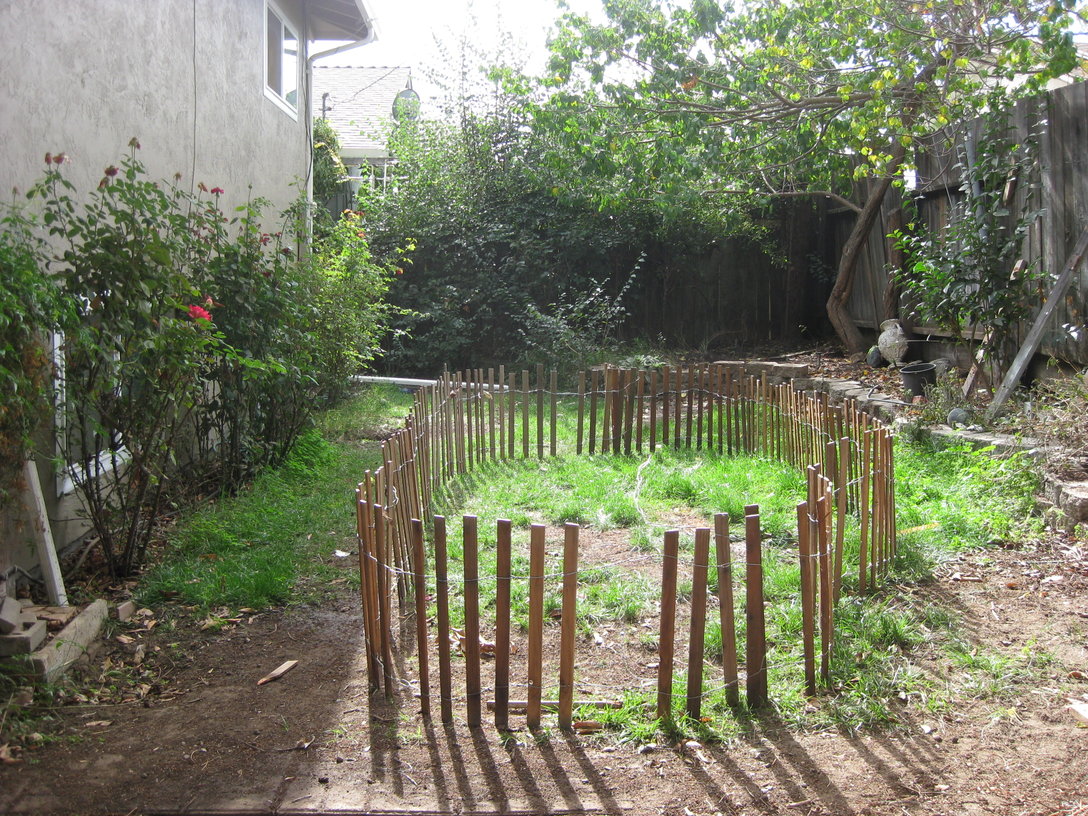
The grassy area in the backyard is about 15 feet wide and 30 feet long. This year I decided to use some 2 foot tall fencing I have to mark out an inverted U-shaped pathway through the graveyard, with the characters and decorations inside the U, on the sides, and on the opposite side of the path past the end of the U. This worked better than the open area I had last year, because it kept people moving along, so more people could experience the graveyard more quickly, and it helped keep the kids from hitting the characters in the graveyard.

I bought the fencing at the hardware store a few years ago and store it in the side yard, so it has a great weathered, run-down look, with some of the fenceposts missing. It really helps set the tone.

With the fencing all laid out it was time to bring in the decorations. First was a hanging ghost guy. He’s supposed to light up and make weird noises, but after a year in storage he had stopped working. He still looks good though, so I decided to use him.

Next was a standing mummy with light-up eyes that makes creepy noises. I got him cheap the day after Halloween last year, but I hadn’t tried him out until now. I think he worked pretty well. He didn’t stay in that position though, as you can see in later pictures. I also brought out our collection of tombstones. These are great because they fill a lot of space, and with appropriate lighting on them they actually look pretty spooky at night. They’re just made of styrofoam, so I used tent stakes behind them, with the hook actually digging into the foam, to hold them up.

Then I put in an animated ghost guy with light-up eyes and, of course, creepy noises. He’s sitting down in this picture, between the mummy and the tombstones. Behind the far fence, past the mummy, you can just make out the yellow eyes of a giant inflatable spider that I borrow from my sister-in-law for the event.

My 16-year-old daughter helps me set up the graveyard. Here we’ve put some cobwebs on the fence, for ambiance.

We also put some plain white masks in the bushes on the left side. Those turned out really well, since they are just featureless, eyeless faces. With a blacklight behind them they glow in a very eerie way too. And, they were the cheapest item out there, at just a couple bucks each.

The next addition was a pop-up zombie character, on the right hand side. Hard to see since he’s laying down in this picture. You can see the mummy in a new position further back too. That’s still not his final resting place (ha!) though.

Everything’s in place here. The mummy has been moved, again, to the right side of the graveyard. The animated ghost is standing up in this picture so he’s easier to see.

Here’s a picture of the graveyard after dark. There’s a fog machine in the back, making the smoke you see. The yellow glow in back is from the giant spider. The blue glow on the left is from the masks in the bushes.

A couple details are hard to see in those pictures, but I was really pleased with how they turned out so I got close-up shots of them. First is a collection of zombie Barbies. I got the idea here, which I must have found via Reddit. It’s really easy to make zombie Barbies — just grab a bunch of old Barbie dolls (my 7 year old had about 50, so she was happy to sacrifice a few for the cause), spray paint them white, then use a Sharpie to blacken the eyes and make scars. Everybody agreed that the Barbies were super creepy:

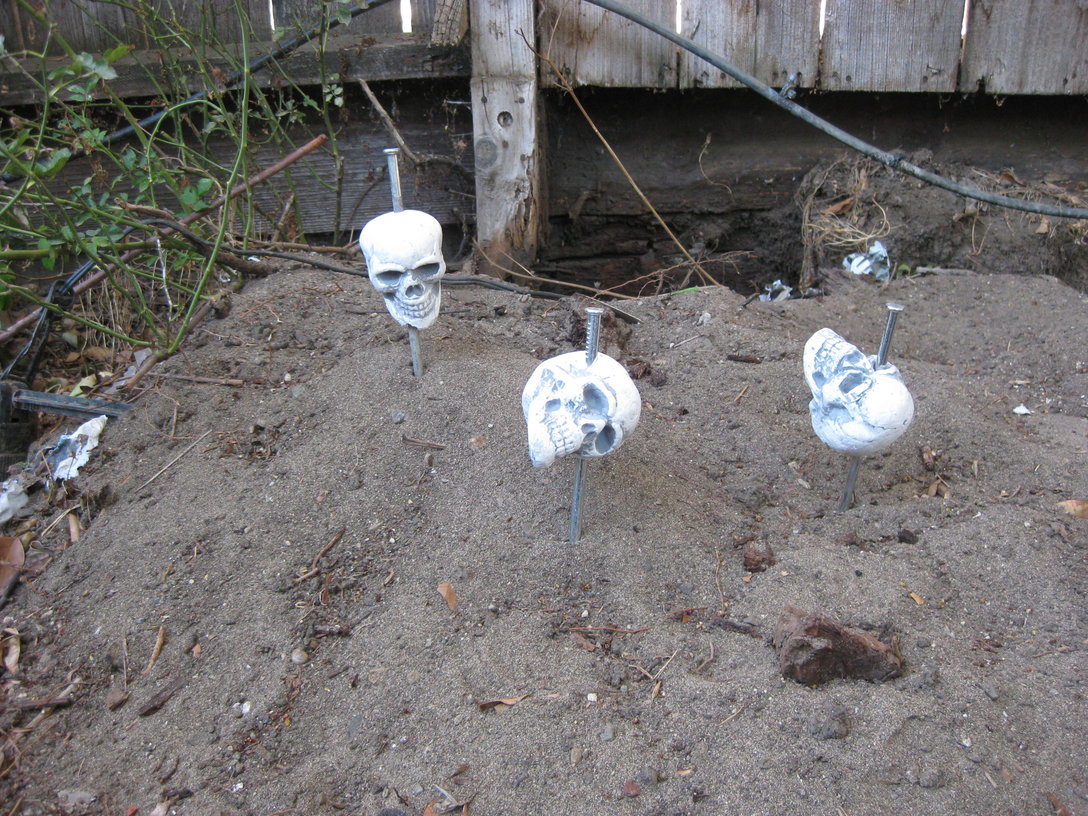
Next are these little skulls. These were just some cheap styrofoam skulls that came in a multi-pack of “graveyard stuff” from the Halloween super store. Last year I just arranged them around the tombstones, but this time I got a little more creative.

I also really liked this flying ghost. He’s attached to a cord that’s stretched taut between a tree and our house. He moves back-and-forth along the cord, making weird noises as he goes.

Finally, here’s a shot of one of the creepy masks I mentioned. Remember, this is just a $3 mask and a black light. Hard to beat that bang-to-buck ratio!

Here’s the obligatory “action shot” of the graveyard from the party. You can just make out my daughter in the back. She likes to watch the kids go through the graveyard, and she makes loud noises now and then to trigger the sound-activated characters, if the kids aren’t noisy enough themselves.

If success is measured by the number of kids that are too scared to finish walking through the graveyard, or who refuse to go into the backyard afterwards, then this year’s graveyard was a smashing success. But there’s still plenty of room for improvement. Next year I need more lights, to better highlight some of the characters. And I need some kind of curtain or partition down the middle of the central area, so that you can’t see what’s on the right side of the graveyard as you’re walking on the left side, maybe something like this wall of fog. Last, I think I can do more with the zombie Barbies — perhaps a zombie Barbie mansion, complete with a partially eaten Ken?

Good thing I have a year to plan!